Cricut vs Silhouette: Which Cutting Machine is Right for You?
Standing in the craft store aisle, staring at two impressive cutting machines, you might feel completely overwhelmed. Cricut vs Silhouette: which cutting machine is right for you? This question haunts thousands of crafters every day, and making the wrong choice could mean wasted money and frustration.
Both brands dominate the electronic cutting machine market, each with passionate supporters who swear by their chosen tool. Here’s the thing—there’s no universal “best” machine. The right choice depends entirely on your crafting goals, budget, technical comfort level, and the types of projects you want to create.
In this comprehensive guide, you’ll discover the honest differences between these two powerhouses. By the end, you’ll know exactly which machine deserves a spot in your craft room.
Understanding the Cricut vs Silhouette Battle
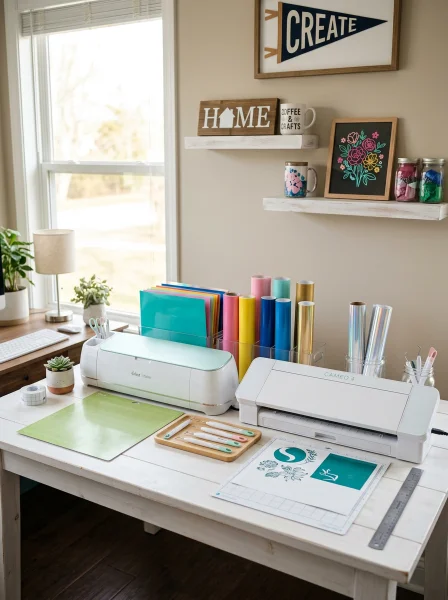
Before diving into specifics, let’s establish what makes these brands different at their core. Cricut and Silhouette both create electronic cutting machines that slice through vinyl, paper, cardstock, fabric, and dozens of other materials with precision. However, their approach to crafting differs significantly.
Cricut focuses on user-friendliness and accessibility. Their ecosystem caters to beginners while still offering advanced capabilities. The company emphasizes a plug-and-play experience where you can start creating within minutes of unboxing.
Silhouette takes a more technical approach. Their machines offer deeper customization options and appeal to crafters who want granular control over every cut setting. Think of it as the difference between an iPhone and an Android—both excellent, but different philosophies.
If you’re just getting started with crafting, you might also enjoy exploring fun crafts to make at home that don’t require expensive equipment while you decide.
Comparing Popular Models: Features That Matter

Cricut’s Main Lineup
The Cricut Maker 3 sits at the top of their lineup, cutting over 300 materials including balsa wood, leather, and fabric without backing. It offers Smart Materials compatibility for matless cutting up to 12 feet long. The cutting force reaches 4 kg, making it powerful enough for thicker materials.
The Cricut Explore 3 serves as the mid-range workhorse. It handles most common crafting materials beautifully and cuts twice as fast as previous models. For most hobbyists creating vinyl decals, paper crafts, and iron-on projects, this machine delivers exceptional value.
Cricut Joy targets casual crafters and those with limited space. This compact machine handles smaller projects perfectly and remains incredibly portable.
Silhouette’s Arsenal

The Silhouette Cameo 4 matches up against the Explore and Maker series. It features a powerful cutting force of 5 kg (slightly more than Cricut Maker) and includes a built-in roll feeder. The dual carriage allows simultaneous use of two different tools.
Silhouette Portrait 3 competes with Cricut Joy, offering an 8-inch cutting width in a compact form factor. It’s perfect for small-scale projects and crafters working in tight spaces. Silhouette Curio adds stippling, etching, and embossing capabilities—unique features you won’t find in Cricut machines.
Software Showdown: Design Studio vs Silhouette Studio

The software experience often becomes the deciding factor for many crafters. Here’s where opinions get heated. Cricut Design Space operates as a cloud-based application.
Your projects save online, accessible from any device. The interface feels intuitive, with drag-and-drop functionality that beginners appreciate. However, you need internet connectivity to design, which frustrates some users.
The free version provides limited fonts and images, pushing users toward the $9.99/month Cricut Access subscription. Silhouette Studio runs locally on your computer—no internet required after initial setup. The free version includes more design capabilities than Cricut’s free tier.
For advanced features like .svg import without conversion, you’ll need the Designer Edition ($49.99 one-time purchase) or Business Edition ($99.99). Many crafters appreciate that these are one-time purchases rather than subscriptions. For crafters who love creating personalized presents, both machines excel at making DIY handmade gifts that look professionally made.
Material Compatibility: What Can Each Machine Cut?
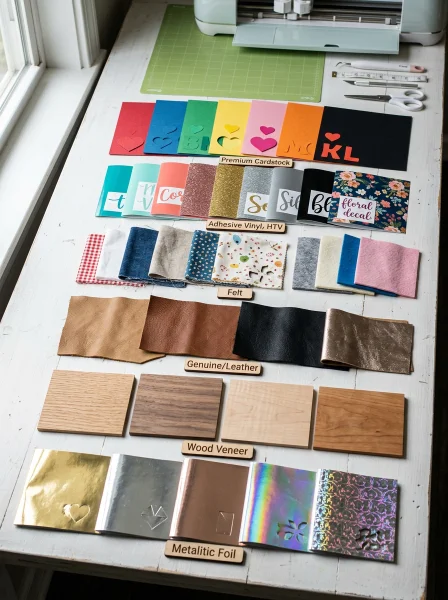
Both machines handle standard crafting materials exceptionally well:
- Vinyl (adhesive and heat transfer)
- Cardstock and paper
- Iron-on materials
- Sticker paper
- Thin leather and faux leather
- Fabric (with appropriate settings)
Where Cricut Maker excels: The adaptive tool system automatically adjusts pressure and cut speed. Specialty tools like the rotary blade cut fabric without backing material, while the knife blade tackles materials up to 2.4mm thick including balsa wood and chipboard. Where Silhouette Cameo 4 excels: The higher cutting force (5 kg vs 4 kg) gives it a slight edge on thicker materials.
The Kraft Blade cuts chipboard and thicker materials effectively. Some users report cleaner cuts on intricate designs.
Price Comparison: Initial Investment and Ongoing Costs
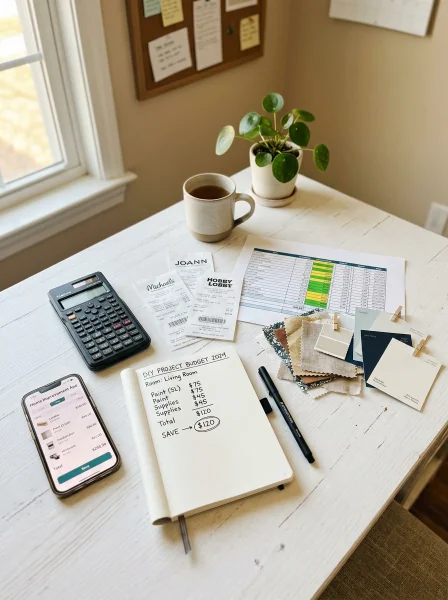
Let’s talk money—because budget matters. Machine Prices (approximate retail):
- Cricut Joy: $179
- Cricut Explore 3: $299
- Cricut Maker 3: $399
- Silhouette Portrait 3: $199
- Silhouette Cameo 4: $299
- Silhouette Cameo 4 Plus: $349
Ongoing costs differ significantly. Cricut’s subscription model ($9.99/month for Access) adds up over time. Silhouette’s one-time software upgrades prove more economical for long-term users.
However, Cricut Access includes thousands of ready-to-cut designs, which saves time for those who prefer not to create from scratch. Both brands sell proprietary materials, though third-party alternatives work with either machine. Smart crafters often find dollar store crafts ideas that stretch their supply budget further.
Ease of Use: Which Machine Has the Gentler Learning Curve?
Cricut wins for absolute beginners. Design Space guides you through projects step-by-step. The interface feels less intimidating, and the ready-made projects help you succeed immediately.
Many users create their first project within an hour of unboxing. Silhouette rewards patience with power. The learning curve feels steeper initially, but users gain more control over their projects.
Once mastered, Silhouette Studio’s capabilities exceed Design Space in many areas—particularly for creating original designs. Consider your personality here. Do you want to create RIGHT NOW with minimal fuss?
Cricut. Do you enjoy learning software deeply and customizing everything? Silhouette.
Best Uses for Each Machine

Choose Cricut If You:
Want the simplest possible setup and start experience. Plan to use ready-made designs frequently. Value mobile app functionality (Cricut’s app is more capable).
Create lots of handmade gift craft ideas using templates. Prefer subscription services over learning complex software.
Choose Silhouette If You:
Design everything from scratch in your own software. Dislike ongoing subscription costs. Want maximum control over cut settings.
Already use Adobe Illustrator or similar programs. Plan to start a craft business needing Print & Cut precision.
Real Crafter Experiences: What Users Actually Say
After surveying dozens of crafters who own both machines, patterns emerge. Cricut owners love: The community support and abundance of tutorials. The clean, modern machine design.
How quickly they started creating. The variety of specialty tools available. Cricut owners dislike: Mandatory internet connection for designing.
Subscription pressure for full functionality. Occasional software glitches. Silhouette owners love: Offline software capability.
One-time purchase upgrades. Deeper control over settings. Better handling of intricate cuts.
Silhouette owners dislike: Steeper learning curve. Less intuitive initial experience. Smaller community compared to Cricut.
Many serious crafters eventually own both machines, using each for its strengths. Starting with one and expanding later makes sense for many people who enjoy home craft projects quick and easy.
Making Your Final Decision
After examining every angle of the Cricut vs Silhouette debate, here’s the bottom line. Buy Cricut if: You’re a beginner who values simplicity. You don’t mind subscription costs for access to designs.
You want the largest online community for support. You primarily work with standard materials like vinyl and paper. Buy Silhouette if: You’re technically inclined and enjoy learning software.
You design everything yourself. You hate ongoing subscription fees. You need precise control over cut settings for business purposes.
Both machines create stunning projects. Neither choice is wrong—only different.
Conclusion: Which Cutting Machine is Right for You?
The Cricut vs Silhouette: which cutting machine is right for you question ultimately comes down to your crafting style, technical comfort, and budget preferences. Cricut offers an accessible, subscription-based ecosystem perfect for hobbyists who want quick results. Silhouette delivers powerful, customizable tools for crafters who crave control and prefer one-time purchases.
Neither machine will disappoint if matched correctly to your needs. Consider starting with your budget, then evaluating how you plan to design—using templates or creating from scratch. Visit local craft stores when possible to see both machines in action.
Whichever you choose, you’re investing in a tool that opens unlimited creative possibilities. From custom t-shirts to intricate paper crafts, personalized gifts to home décor, your cutting machine will become your most-used crafting companion. Ready to start your cutting machine journey?
Share which machine caught your attention in the comments below! Already own one? Tell us about your experience helping others decide.
And if you found this comparison helpful, share it with a crafting friend facing the same decision.
FAQ
Q: Is Cricut or Silhouette better for beginners? A: Cricut generally provides an easier starting experience with its intuitive Design Space software and guided projects. Beginners often create their first successful project within an hour.
However, Silhouette isn’t difficult—it just offers more options that can feel overwhelming initially. Q: Can I use Cricut materials in a Silhouette machine? A: Yes, most cutting materials work interchangeably between brands.
Vinyl, cardstock, iron-on, and other standard materials aren’t machine-specific. The exception is Cricut’s Smart Materials designed for matless cutting, which require specific Cricut machines. Q: Which cutting machine is better for starting a craft business?
A: When considering Cricut vs Silhouette for business purposes, Silhouette’s one-time software purchase model proves more economical long-term. The Business Edition software includes commercial-friendly features. However, many successful craft businesses use Cricut machines with Access subscriptions—both work professionally.
Q: Do I need internet to use Cricut or Silhouette machines? A: Cricut Design Space requires internet connectivity for most design functions, storing projects in the cloud. Silhouette Studio operates entirely offline after installation, saving projects locally on your computer.
This difference matters significantly for crafters with unreliable internet. Q: How long do Cricut and Silhouette machines typically last? A: Both brands build durable machines lasting 5-10+ years with proper maintenance.
Regular blade replacement, mat care, and keeping the machine clean extend lifespan significantly. Many crafters still use machines purchased 7-8 years ago without issues.